Blog
What is SIP Hotspot?

What is SIP Hotspot? The Complete Guide You Were Actually Looking For (2025)
Quick Answer: A SIP hotspot is a network access point that uses the Session Initiation Protocol (SIP) to manage voice, video, and data communication — essentially letting devices make VoIP calls over a shared Wi-Fi or mobile connection. But that’s just the surface. Keep reading to understand exactly how it changes your communication game.
What is SIP? (Understanding the Foundation First)
Before we talk about SIP hotspots, let’s quickly nail down what SIP means.
SIP stands for Session Initiation Protocol. It’s a signaling protocol used to initiate, maintain, and terminate real-time communication sessions — including voice calls, video calls, and messaging — over the internet.
Think of SIP as the “dialing system” of the internet. When you make a VoIP call (Voice over IP), SIP is often the technology behind it, setting up and managing that call.
SIP is used by:
- Business phone systems (PBX)
- VoIP apps and softphones
- Video conferencing tools
- Unified Communication platforms
What is a SIP Hotspot? (The Real Definition)
A SIP hotspot is a network access point — typically a Wi-Fi router or mobile hotspot device — that is configured to support SIP-based VoIP communication.
In simpler terms: it’s a hotspot that doesn’t just give you internet access, but is optimized or enabled to let connected devices make and receive SIP/VoIP calls seamlessly.
There are two common contexts where you’ll hear “SIP hotspot”:
1. SIP-Enabled Wi-Fi Hotspot (Fixed/Office Setup)
A router or access point in a home or office that has been configured with SIP ALG (Application Layer Gateway) or SIP passthrough, allowing VoIP phones and SIP clients to work correctly on the network.
2. Mobile SIP Hotspot (On-the-Go VoIP)
A mobile hotspot (like a 4G/5G MiFi device) that provides internet connectivity to devices, which then use a SIP app or softphone to make calls. Some advanced MiFi devices have built-in SIP client support.
How Does a SIP Hotspot Work?
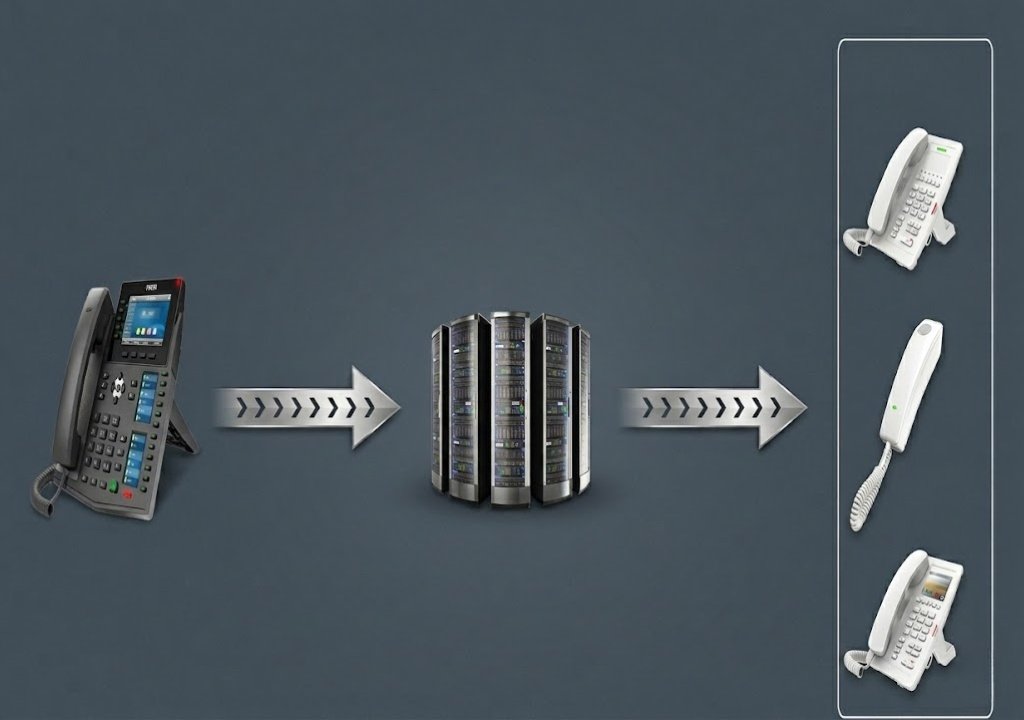
Here’s the simplified flow of how a SIP hotspot works:
Your Device (SIP Client)
        ↓
  SIP Hotspot (Wi-Fi or Mobile Data)
        ↓
  Internet → SIP Server / VoIP Provider
        ↓
  Other Party's Phone / SIP Client
Step-by-step:
- Your SIP-enabled device (IP phone, smartphone with SIP app, laptop softphone) connects to the hotspot.
- The hotspot provides internet access.
- Your SIP client registers with a SIP server (provided by your VoIP service provider).
- When you dial a number, the SIP protocol sends a signal (“INVITE”) to the SIP server.
- The server routes the call to the recipient.
- Voice/video data flows over the connection using RTP (Real-time Transport Protocol).
The key difference from regular internet: the hotspot must allow SIP traffic without blocking or distorting it. Some routers have SIP ALG enabled by default, which can actually cause problems — more on that in the expert tips section below.
Why Do People Use SIP Hotspots?
Great question. Here’s why SIP hotspots are gaining serious traction:
Cost Savings on Calls
SIP calls — especially international ones — cost a fraction of traditional PSTN (public telephone network) calls. Businesses save thousands of taka monthly.
Mobility and Flexibility
A mobile SIP hotspot lets you carry your business phone number anywhere. You can make professional calls from a tea stall in Dhaka or a coworking space in Chittagong.
Scalability
Adding new phone lines with SIP is easy and cheap. No need to run physical cables or buy new hardware for every employee.
Unified Communications
SIP supports voice, video, messaging, and presence — all on one platform.
Works with Existing Hardware
Many modern IP phones, routers, and smartphones support SIP natively.
Types of SIP Hotspot Devices
| Device Type | Best For | Example Brands | Price Range (BD) |
|---|---|---|---|
| SIP-enabled Wi-Fi Router | Home/Office VoIP | TP-Link, MikroTik, Grandstream | ৳3,500 – ৳15,000 |
| 4G/5G Mobile MiFi (SIP-capable) | Remote workers, travel | Huawei, ZTE, Netgear | ৳3,000 – ৳10,000 |
| SIP ATA + Standard Router | Analog phone users | Grandstream HT802, Linksys | ৳2,500 – ৳6,000 |
| IP Phone with Wi-Fi | Desk/office calling | Yealink, Fanvil, Grandstream | ৳4,000 – ৳20,000+ |
| Smartphone (SIP App) | Personal/low budget | Any Android/iOS | Free (app only) |
SIP Hotspot vs Regular Hotspot: What’s the Difference?
Many people confuse a SIP hotspot with a regular internet hotspot. Here’s the key distinction:
| Feature | Regular Hotspot | SIP Hotspot |
|---|---|---|
| Internet Access | Yes | Yes |
| VoIP Call Support | May block/distort | Optimized for SIP |
| SIP ALG Configuration | Not considered | Properly configured |
| Business Phone Integration | No | Yes |
| QoS for Voice Traffic | No | Yes (usually) |
| Cost for Calls | Standard data charges | Cheap VoIP rates |
every SIP hotspot is a hotspot, but not every hotspot is SIP-ready. Read More about IP Phone SIP Hotspot
Setting Up a SIP Hotspot: Step-by-Step
Option A: Configure Your Existing Router for SIP
- Log into your router admin panel (usually 192.168.0.1 or 192.168.1.1)
- Go to Advanced Settings > SIP ALG
- Disable SIP ALG (this is counterintuitive, but SIP ALG often breaks VoIP — see Expert Tips)
- Enable QoS (Quality of Service) and prioritize SIP/RTP traffic
- Open necessary ports: UDP 5060 (SIP) and UDP 10000–20000 (RTP)
- Connect your SIP phone or softphone and register with your VoIP provider
Option B: Use a Dedicated SIP-Enabled MiFi Device
- Purchase a 4G MiFi that supports SIP passthrough or built-in SIP client
- Insert your SIM card (Grameenphone, Robi, Banglalink, Teletalk — all work)
- Configure SIP settings in the device admin portal
- Connect your devices and start making calls
Option C: Use a Smartphone as a SIP Hotspot
- Enable Mobile Hotspot on your Android/iPhone
- Connect other devices to the hotspot
- Install a SIP app (Zoiper, Linphone, Grandstream Wave) on those devices
- Register with a SIP/VoIP provider
- Make calls at VoIP rates
Pros and Cons of SIP Hotspots
Pros
- Low cost — drastically reduces call expenses
- Portability — make business calls from anywhere
- Scalability — add lines without physical infrastructure
- HD voice quality — often better than traditional calls
- Feature-rich — voicemail, call forwarding, IVR, conferencing
- No long-term contracts — most SIP providers are pay-as-you-go
Cons
- Internet dependency — poor connection = poor call quality
- Initial setup complexity — requires some technical knowledge
- SIP ALG issues — misconfigured routers can break calls
- Security risks — SIP is vulnerable to toll fraud if not secured
- Emergency calls — VoIP may not reliably connect to emergency services (999 in BD)
Expert Tips for Better SIP Hotspot Performance
These are the tips most generic blogs skip. Pay attention.
1. Always Disable SIP ALG on Your Router SIP ALG (Application Layer Gateway) was designed to help SIP traffic but often corrupts SIP packets instead. Unless your router manufacturer specifically says it’s safe, turn it off.
2. Use QoS to Prioritize Voice Traffic Voice calls are sensitive to latency and jitter. In your router settings, set VoIP/SIP as the highest priority traffic type. This prevents video streaming or downloads from degrading call quality.
3. Choose a SIP Provider with a Local or Regional Server The closer the SIP server is to you, the lower the latency. For Bangladesh users, look for providers with servers in Singapore or India for best results.
4. Use SRTP and TLS for Security Secure Real-time Transport Protocol (SRTP) encrypts your voice data. Transport Layer Security (TLS) secures the SIP signaling. Without these, your calls can be intercepted or hijacked.
5. Test with Ping and MOS Score Before going live, test your internet connection’s MOS (Mean Opinion Score) using tools like PingPlotter or VoIP test sites. A MOS above 4.0 means excellent call quality.
6. Keep SIP Credentials Private SIP accounts are a target for toll fraud. Use strong passwords, restrict login by IP if possible, and monitor your account for unusual usage.
Common Problems and How to Fix Them
| Problem | Likely Cause | Fix |
|---|---|---|
| One-way audio | SIP ALG or NAT issue | Disable SIP ALG, configure STUN |
| Can’t register SIP account | Port 5060 blocked | Open UDP 5060 on router/firewall |
| Calls dropping | Unstable internet | Enable QoS, upgrade internet plan |
| Echo on calls | Acoustic feedback | Use headset, enable echo cancellation |
| Poor voice quality | High latency/jitter | Use wired connection, reduce network load |
FAQ: What People Also Ask About SIP Hotspot
What is a SIP hotspot used for?
A SIP hotspot is used to enable VoIP (Voice over IP) communication over a Wi-Fi or mobile internet connection. It allows users to make and receive phone calls using SIP protocol, often at much lower cost than traditional phone lines. It’s widely used for business communication, remote work, and international calling.
Is SIP the same as VoIP?
Not exactly. VoIP is the broader technology for making calls over the internet. SIP is a specific protocol used within VoIP systems to initiate and manage sessions. Think of VoIP as the car and SIP as the engine powering it. Other protocols like H.323 also support VoIP.
Can I use a SIP hotspot on my smartphone?
Yes! You can turn your smartphone into a SIP endpoint by installing a SIP app like Zoiper or Linphone. Your phone’s hotspot (or any Wi-Fi) becomes the “SIP hotspot” — you just need a SIP account from a VoIP provider and an internet connection.
Is SIP calling legal in Bangladesh?
Using SIP/VoIP for personal or business communication over the internet is generally legal in Bangladesh. However, bypass VoIP (using VoIP to terminate calls into the PSTN without proper licensing) is regulated by BTRC. Always use licensed VoIP services for commercial purposes.
What internet speed do I need for a SIP hotspot?
A single SIP call typically uses 64–128 Kbps of bandwidth. For a small business with 5 simultaneous calls, you need at least 1–2 Mbps dedicated bandwidth. For best quality, aim for low latency (under 150ms) and minimal packet loss (under 1%).
What is SIP ALG and should I enable it?
SIP ALG (Application Layer Gateway) is a router feature that modifies SIP packets passing through. Despite being designed to help, it often breaks SIP communication by incorrectly rewriting packet headers. In most cases, you should disable SIP ALG for reliable VoIP performance.
If you’re making frequent calls — especially international ones — or running a business that needs a flexible, scalable phone system, a SIP hotspot is absolutely worth it.
The technology has matured significantly. Setup is easier than ever. Costs are low. And the quality, when properly configured, rivals or beats traditional phone lines.
For Bangladesh users especially, where mobile data is affordable and VoIP adoption is growing, a SIP hotspot setup can transform how you communicate — personally and professionally.
The future of communication is internet-based. SIP hotspots are your gateway to it.