Blog
Analog PABX vs IP PABX: Which One Should You Choose?

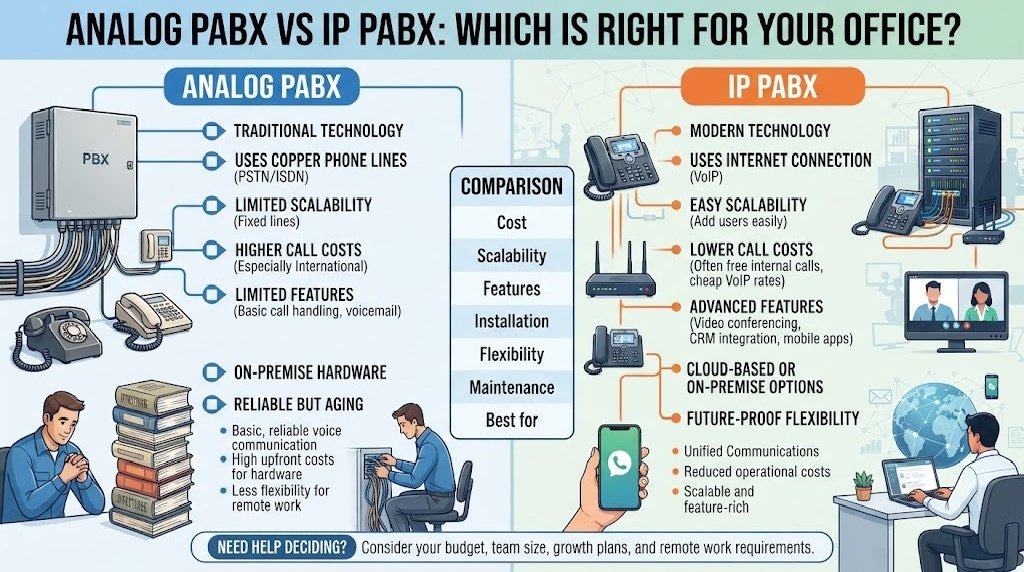
Businesses often compare analog PABX vs IP PABX when planning a new office telephone system or upgrading an existing installation. Both systems can connect internal extensions, manage incoming and outgoing calls, and support business communication. However, they use different technologies and offer different levels of flexibility.
An analog PABX uses traditional telephone lines and compatible analog handsets. An IP PABX uses an IP network to carry voice communication through IP phones, SIP phones, softphones, or other network-based devices.
The right choice depends on your office size, existing wiring, network quality, remote-work needs, budget, and future expansion plans.
What Is an Analog PABX?
An analog PABX is a traditional office telephone system that uses analog telephone signals and dedicated telephone wiring.
A typical analog PABX setup looks like this:
Telephone provider line → Analog PABX → Analog telephone sets
The system connects internal users through extensions and allows several users to share a limited number of outside lines.
Common features of analog PABX
- Internal extension calling
- Incoming and outgoing call handling
- Call transfer
- Call hold
- Call forwarding
- Basic conference calling
- Call restriction
- Receptionist operation
- Department extensions
Analog PABX is often selected by businesses that want a straightforward telephone system and already have telephone cabling in place.
What Is an IP PABX?
An IP PABX is a network-based telephone system that handles voice communication over an IP network.
A typical IP PABX setup looks like this:
SIP trunk or VoIP service → IP PABX → Network switch → IP phones
An IP PABX can also support:
- SIP phones
- Softphones
- Mobile applications
- Remote extensions
- VoIP gateways
- Call queues
- Auto attendant or IVR
- Call recording
- Voicemail
- Multi-branch communication
- CRM or software integration
Because voice communication travels over the data network, IP PABX can offer more flexibility than a traditional analog system.
Analog PABX vs IP PABX: Quick Comparison
| Feature | Analog PABX | IP PABX |
|---|---|---|
| Main technology | Analog telephone signaling | IP network and VoIP |
| Typical phone type | Analog telephone set | IP phone, SIP phone, softphone |
| Cabling | Telephone cable | Ethernet/network cable |
| Internet requirement | Usually not required for local operation | Often required for VoIP services, remote access, or SIP |
| Internal calling | Yes | Yes |
| Remote extensions | Limited | Stronger support |
| Softphone support | Usually unavailable | Common |
| Multi-branch connectivity | Limited | More flexible |
| Expansion | Depends on available ports | Often easier to expand |
| Advanced software integration | Limited | More available |
| Installation complexity | Usually simpler | Requires network planning |
| Network dependency | Low | Higher |
| Best suited for | Basic office telephony | Flexible, scalable, network-based communication |
How Analog PABX and IP PABX Work Differently
The main difference is how voice signals move through the system.
Analog PABX
In an analog system, the voice signal travels through traditional telephone wiring.
When a user makes a call:
- The analog telephone sends the signal to the PABX.
- The PABX connects the extension to another extension or outside line.
- The voice travels through the telephone line.
IP PABX
In an IP system, the voice is converted into data packets and carried over the network.
When a user makes a call:
- The IP phone captures the voice.
- The system converts the voice into network data.
- The IP PABX routes the call.
- The network delivers the voice to the destination phone or external service.
This network-based architecture is what enables features such as remote extensions, softphones, mobile apps, and multi-location communication.
Telephone Set Compatibility
Telephone compatibility is one of the most important differences between the two systems.
Analog PABX Telephone Sets
Analog PABX generally uses:
- Standard analog telephones
- Corded telephone sets
- Cordless analog handsets
- Some compatible feature phones
However, not every analog phone supports every PABX function. A basic telephone may support calling and answering but may not support advanced programmable features.
IP PABX Telephone Sets
IP PABX commonly uses:
- IP phones
- SIP phones
- Softphones
- Wi-Fi phones
- Mobile applications
IP phones connect through Ethernet or Wi-Fi, depending on the model and deployment.
Important compatibility check
Before purchasing, confirm:
- Extension type
- Port type
- Supported protocol
- Power requirements
- PoE support
- Handset compatibility
- Feature support
- Vendor limitations
A telephone set should not be selected only by appearance or price.
Cabling Requirements
Analog PABX Cabling
Analog PABX normally uses telephone cable from the main unit to each extension.
This may be useful for offices that already have:
- Existing telephone points
- Telephone distribution panels
- Structured telephone wiring
- Older but functional office cabling
Analog cabling advantages
- Simple to understand
- Often easy to troubleshoot
- Usually independent of the data network
- Suitable for basic office installations
IP PABX Cabling
IP PABX commonly uses Ethernet cable and network hardware.
A typical installation may require:
- Cat5e or Cat6 cabling
- Network switches
- Routers
- Patch panels
- IP address planning
- VLAN configuration, where needed
- PoE switches for powered IP phones
IP cabling advantages
- One network can carry data and voice
- Easier to support multiple locations
- Better suited to modern office infrastructure
- More flexible for future expansion
IP cabling risks
- Poor cable quality can affect service
- Network congestion can reduce voice quality
- Incorrect switch configuration can cause problems
- Power failures can affect multiple devices at once
Installation Comparison
Analog PABX Installation
Analog installation is usually more straightforward.
The installer normally needs to:
- Install the PABX unit.
- Connect outside lines.
- Connect extension cables.
- Assign extension numbers.
- Connect telephone sets.
- Configure features.
- Test incoming and outgoing calls.
For a small office with existing telephone wiring, this can be a practical option.
IP PABX Installation
IP PABX requires both telephony planning and network planning.
The installer may need to:
- Install the IP PABX.
- Configure the network.
- Create extension accounts.
- Connect IP phones.
- Configure SIP or VoIP trunks.
- Set up routing rules.
- Configure QoS or voice traffic priority.
- Set up security controls.
- Test local and remote calls.
- Configure backup and monitoring.
The system may be more powerful, but it requires better technical preparation.
Scalability and Future Expansion
Scalability means how easily the system can grow when the business adds users, departments, branches, or features.
Analog PABX scalability
Analog systems can expand, but expansion often depends on:
- Available extension ports
- Available line cards
- Hardware modules
- PABX model limits
- Additional cabling
If the system reaches its maximum capacity, a larger unit or additional hardware may be needed.
IP PABX scalability
IP PABX often provides more flexible expansion.
A business may be able to add:
- New IP extensions
- Remote users
- Branch offices
- Mobile apps
- Softphones
- Additional SIP trunks
However, capacity still depends on the system license, hardware, network design, and service provider.
Practical planning rule
Do not buy a system only for today’s requirements. Consider:
- New employees
- New departments
- Additional locations
- More customer calls
- Remote work
- Future software integration
Remote Extension Support
Remote access is one of the clearest differences between analog and IP PABX.
Analog PABX
Analog systems generally work best within the same office or building.
Remote connectivity may require extra equipment such as:
- Telephone gateways
- Remote extension devices
- Dedicated leased services
- Call forwarding arrangements
IP PABX
IP PABX can support remote extensions through:
- Internet connectivity
- VPN
- SIP registration
- Softphones
- Mobile apps
- Branch-to-branch networking
For example, a sales employee working outside the office may use a softphone or mobile application to connect to the company telephone system.
Remote access should be implemented carefully because security, user authentication, and network quality are important.
Feature Comparison
Many modern systems support common business features, but IP PABX often offers a wider range of software-based functions.
| Feature | Analog PABX | IP PABX |
|---|---|---|
| Extension calling | Yes | Yes |
| Call transfer | Yes | Yes |
| Call hold | Yes | Yes |
| Call forwarding | Often available | Common |
| IVR/auto attendant | Model-dependent | Common on advanced systems |
| Call queue | Limited/model-dependent | Common |
| Call recording | Model-dependent | More widely available |
| Voicemail | Model-dependent | Common |
| Softphone | Rare | Common |
| Mobile app | Rare | Common |
| CRM integration | Limited | More flexible |
| Multi-branch networking | Limited | Stronger |
| Web administration | Less common | Common |
The actual feature list always depends on the manufacturer and model.
Voice Quality
Analog PABX Voice Quality
Analog systems can offer stable voice quality when:
- The cable is good
- The telephone line is clean
- The extension port is working
- There is little electrical interference
Voice problems may come from:
- Damaged cables
- Poor connectors
- Electrical noise
- Faulty handsets
- Poor grounding
IP PABX Voice Quality
IP PABX voice quality depends on the network.
Important factors include:
- Bandwidth
- Latency
- Jitter
- Packet loss
- Switch quality
- Router performance
- Internet stability
- Quality of Service settings
A well-designed IP network can provide clear voice communication. A poorly designed network can create:
- Choppy audio
- Delays
- Echo
- Dropped calls
- One-way audio
Reliability and Power Backup
Power backup is important for both systems, but the impact can be different.
Analog PABX
An analog PABX may continue to serve some telephone functions depending on:
- The PABX power design
- The telephone provider
- The type of external line
- Whether the handsets require local power
IP PABX
An IP system may depend on multiple powered devices:
- IP PABX
- Network switches
- Routers
- Wi-Fi access points
- Internet devices
- IP phones
- SIP gateways
If any critical device loses power, the telephone service may be affected.
Recommended backup planning
- UPS for the PABX
- UPS for network switches
- Backup for router and modem
- Generator support for larger offices
- Backup internet connection, where necessary
- Emergency communication procedure
This is particularly important for businesses in Bangladesh that experience power interruptions or unstable connectivity.
Security Considerations
Analog PABX Security
Analog systems have a smaller network attack surface, but they still need physical security and access control.
Potential risks include:
- Unauthorized access to the equipment
- Call misuse
- Physical line tampering
- Unapproved changes to system settings
IP PABX Security
IP systems require stronger cybersecurity controls.
Important measures include:
- Strong passwords
- Secure administrator access
- Firewall protection
- VPN for remote users
- SIP attack protection
- Regular firmware updates
- User authentication
- Call fraud monitoring
- Access logging
- Limiting public exposure
An improperly secured IP PABX can be targeted for unauthorized calls or system access.
Maintenance and Troubleshooting
Analog PABX Troubleshooting
Typical problems include:
- No dial tone
- No ring
- One extension not working
- Noisy voice
- Faulty cable
- Bad port
- Telephone-set failure
A technician can often isolate the problem by testing:
- The handset
- The cable
- The extension port
- The patching
- The outside line
IP PABX Troubleshooting
IP systems may require checking:
- Extension registration
- IP address conflicts
- Network switch ports
- PoE availability
- SIP trunk status
- Firewall rules
- DNS settings
- Internet connectivity
- Packet loss
- Jitter
- Call routing rules
A useful troubleshooting method
First identify whether the issue affects:
- One user
- One department
- All internal calls
- All external calls
- Incoming calls only
- Outgoing calls only
- Remote users only
This helps determine whether the cause is local equipment, the PABX configuration, the network, or the telephone service.
Cost Comparison
The total cost should include more than the price of the main PABX unit.
Analog PABX cost factors
- PABX main unit
- Extension cards
- Line cards
- Analog telephone sets
- Telephone cabling
- Installation
- Maintenance
- Spare parts
- Expansion modules
IP PABX cost factors
- IP PABX hardware or software
- IP phones
- SIP trunks or VoIP services
- Network switches
- PoE equipment
- Ethernet cabling
- Firewall or security tools
- Installation and configuration
- Licensing
- Maintenance
- Internet service
- Backup power
An IP PABX may offer more features, but the network and licensing costs should be included in the overall budget.
A low initial price does not always mean a lower total cost over time.
Which System Is Better for a Small Office?
A small office may benefit from an analog PABX when:
- It has a limited number of users
- It already has telephone wiring
- It wants basic extension calling
- It does not need remote users
- It wants simple operation
- It uses traditional telephone lines
An IP PABX may be more suitable when:
- The office already has a strong network
- It wants IP phones
- It expects rapid growth
- It needs remote extensions
- It uses SIP or VoIP
- It wants IVR, queues, or software integration
The correct choice depends on actual needs, not only office size.
Which System Is Better for a Growing Business?
A growing business often values:
- Easy expansion
- Multi-branch support
- Remote access
- Software integration
- Call reporting
- Centralized administration
- Flexible user management
These requirements may favor IP PABX, especially when the company already operates a structured network.
However, a traditional analog system may remain practical if:
- The office has reliable telephone infrastructure
- The business only needs standard features
- Remote access is not a priority
- The organization prefers simpler maintenance
Which System Is Better for a Hotel, Hospital, or Factory?
The best option depends on the environment and operating requirements.
Hotels
Hotels may need:
- Room extensions
- Reception console
- Wake-up calls
- Call accounting
- Department groups
- Guest communication features
Hospitals and Clinics
They may need:
- Department-based extensions
- Nurse stations
- Reception handling
- Emergency communication
- Reliable power backup
- Controlled outbound calling
Factories
They may need:
- Wide-area extension coverage
- Production-floor phones
- Security or gatehouse communication
- Rugged telephone locations
- Paging or intercom integration
- Backup communication during outages
Both analog and IP systems can be used in these environments. The final decision should consider installation conditions, distance, network availability, reliability, and service support.
Decision Checklist for Bangladesh Businesses
Use the following checklist when comparing analog PABX vs IP PABX.
Choose analog PABX if:
- Your office already has telephone cabling.
- You need basic internal and external calling.
- Your user count is relatively stable.
- Remote working is not a major requirement.
- You prefer simpler installation.
- You use traditional telephone lines.
- You want to avoid depending heavily on the data network.
Choose IP PABX if:
- Your business already has a reliable IP network.
- You need SIP, VoIP, or softphones.
- You have multiple branches.
- Remote extensions are important.
- You want easier user expansion.
- You need advanced call management.
- You plan to integrate telephony with software systems.
Questions to Ask a PABX Supplier
Before buying, ask:
- How many extensions does the system support?
- How many outside lines or trunks can it handle?
- Which telephone sets are compatible?
- Does it support analog, digital, or IP phones?
- Can it support future expansion?
- Does it support IVR and call queues?
- Can it connect remote users?
- What happens during a power failure?
- What installation and training are included?
- Is local technical support available in Bangladesh?
- Are spare parts and replacement units available?
- What is the warranty period?
- Are there recurring license or service fees?
- How are system backups handled?
- What security measures are included?
Frequently Asked Questions
Is IP PABX better than analog PABX?
Not automatically. IP PABX offers more flexibility and advanced features, while analog PABX can be simpler and more practical for basic office communication.
Can I use existing analog phones with an IP PABX?
Usually not directly, unless you use an appropriate analog telephone adapter or a compatible gateway.
Can I use IP phones with an analog PABX?
Normally, no. An analog PABX is designed for analog or compatible digital extension devices.
Does IP PABX require internet?
It may require internet for SIP trunks, remote extensions, or cloud services. Internal IP calling may continue over the local network even when the internet is unavailable.
Is analog PABX easier to maintain?
For small installations, it can be easier to understand and troubleshoot. However, maintenance still depends on the equipment, cabling, and technician experience.
Can an analog PABX support call transfer?
Many systems do, but the feature depends on the model and compatible telephone set.
Can IP PABX support mobile users?
Many IP PABX systems support mobile users through apps, softphones, VPN, or SIP-based connectivity.
Which system is cheaper in Bangladesh?
The answer depends on the complete installation. Compare the total cost of the system, phones, cabling, network hardware, service, licensing, maintenance, and power backup.
Can an office switch from analog PABX to IP PABX later?
Yes, but the upgrade may require new phones, network cabling, configuration, and possibly a different external telephone service.
What is the biggest mistake when choosing a PABX?
Choosing based only on the main unit’s price without checking extension capacity, telephone compatibility, installation quality, expansion needs, and support availability.
The decision between analog PABX vs IP PABX should be based on how your business communicates today and how it may operate in the future.
Analog PABX remains useful for organizations that want straightforward office telephony, already have telephone wiring, and do not need extensive remote or software-based features.
IP PABX is often a better fit for businesses that need:
- Remote extensions
- SIP or VoIP
- Softphones
- Multi-branch communication
- Call queues
- Mobile access
- Software integration
- Flexible expansion
For businesses in Bangladesh, also consider:
- Power backup
- Internet stability
- Local installation support
- Telephone-set compatibility
- Spare parts
- Maintenance availability
- Future user growth
The best choice is not the system with the longest feature list. It is the system that matches your office size, infrastructure, budget, communication needs, and long-term plans.